
By NaJade · DJ in Bangkok · Published September 28, 2026
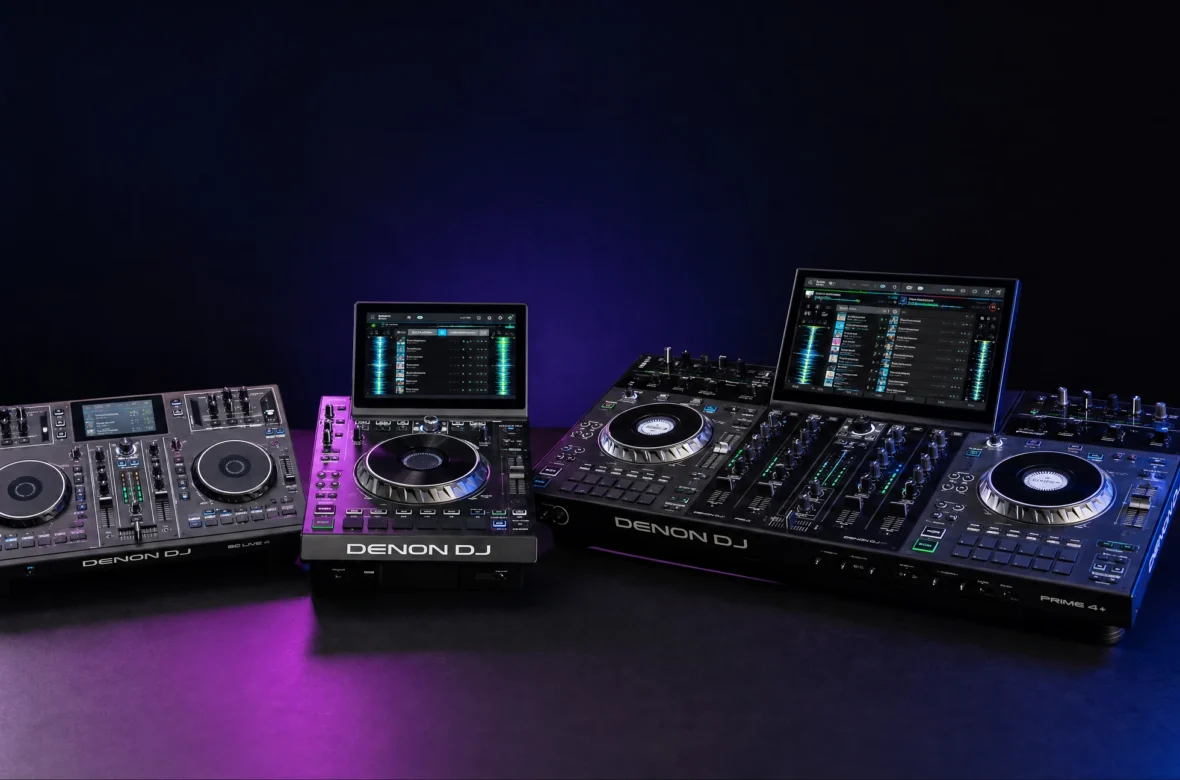
Denon DJ is the standalone specialist — more features per dollar than Pioneer, and the brand that made the laptop-free 4-deck setup normal. Here’s the whole Engine DJ range explained, so you can find the right one fast.
Prime 4+, Prime GO, SC Live 4, SC6000… Denon’s lineup can look as confusing as Pioneer’s, but there’s a clear logic once you see it. Denon DJ built its reputation on one idea — standalone, laptop-free DJing powered by its Engine OS software — and it typically packs in more features for the money than the equivalent Pioneer gear (bigger screens, dual-layer players, built-in streaming, true 4-deck standalone). This guide maps the entire current Denon range by type and purpose, with an honest take on who each unit is for, and where Denon wins and loses against Pioneer. I play Pioneer standalone myself, so I’ll give you a fair, working-DJ view of both.
Denon DJ’s range is built around Engine OS standalone gear: the Prime series (all-in-one systems like the Prime 4+, Prime 2, and portable Prime GO), the SC Live systems (standalone with built-in speakers), the SC pro media players (SC6000, SC6000M, SC5000 — Pioneer CDJ rivals), the X1850 club mixer, and the LC6000 expansion controller. Denon usually offers more features per dollar than Pioneer — the trade-off is that clubs still overwhelmingly use Pioneer.
First: What Is Engine DJ?
The thing that ties the whole Denon range together is Engine DJ (and the on-hardware version, Engine OS). It’s Denon’s ecosystem — the desktop software you use to prepare and organise your library, and the operating system that runs on the gear itself so it can play standalone without a laptop. It’s the direct rival to Pioneer’s rekordbox. You analyse tracks and build playlists in Engine DJ on your computer, export to a USB drive or the unit’s internal storage, and then play laptop-free. Most Denon gear can also act as a controller for Serato DJ Pro, Virtual DJ, or djay if you prefer software. Understanding Engine DJ is the key to understanding why Denon gear works the way it does.
How the Range Is Organised
Denon’s lineup splits into a few clear families:
- Prime series — all-in-one standalone systems (decks + mixer + screen in one box). The core range, from the portable Prime GO to the flagship Prime 4+.
- SC Live series — standalone systems with built-in speakers, aimed at convenience and home/mobile use.
- SC media players — modular pro players (like Pioneer’s CDJs) that need a separate mixer; the SC6000/SC6000M/SC5000.
- X mixers — club mixers such as the X1850 Prime that anchor an SC-player setup.
- LC6000 — an expansion controller that adds hands-on control of a second layer or extra decks.
If you’re brand new, you may want to start with my best DJ controller for beginners guide and the CDJ vs controller explainer first, then come back here to pick a specific Denon model.
The Full Denon DJ Range at a Glance
Here’s the current lineup in one table — type, decks, screen, whether it plays standalone, and who each is for. Tap any model below the table for its full guide.
| Model | Type | Decks | Screen | Standalone? | Best for |
|---|---|---|---|---|---|
| Prime GO | Portable all-in-one | 2 | 7″ | Yes (battery) | Mobile/outdoor, play anywhere |
| Prime 2 | All-in-one | 2 | 7″ | Yes | Home/mobile 2-deck standalone |
| Prime 4+ | All-in-one | 4 | 10″ | Yes (true 4-deck) | Flagship laptop-free 4-deck |
| SC Live 2 | All-in-one + speakers | 2 | 7″ | Yes | Plug-and-play home use |
| SC Live 4 | All-in-one + speakers | 4 | 7″ | Yes | 4-deck standalone with speakers |
| SC6000 | Pro media player | Dual-layer | 10.1″ | Yes (needs mixer) | Flagship CDJ alternative |
| SC6000M | Pro media player (motorized) | Dual-layer | 10.1″ | Yes (needs mixer) | Turntable feel, scratch DJs |
| SC5000 | Pro media player | Dual-layer | 7″ | Yes (needs mixer) | Budget/used pro player |
| X1850 | Club mixer | 4-channel | — | Mixer | Anchoring an SC-player rig |
| LC6000 | Expansion controller | 1 layer | 3.5″ | Add-on | Extra hands-on control |
Prime Series: All-in-One Standalone Systems
The heart of the range — decks, mixer, and screen in one box, no laptop needed.
Prime 4+ — the flagship 4-deck
Denon’s top all-in-one: true independent 4-deck standalone play, a big 10″ touchscreen, metal jog wheels, and pro connectivity. Its 4-deck-from-USB ability is the very thing Pioneer’s XDJ-XZ can’t do. Full Denon Prime 4+ guide.
Prime 2 — the 2-deck sweet spot
A 2-channel standalone with a 7″ screen — a strong XDJ-RX3 rival, more compact than the Prime 4+ but with the same Engine OS power. Full Denon Prime 2 guide.
Prime GO — the portable one
A rechargeable, battery-powered 2-deck standalone you can play literally anywhere — beaches, rooftops, pop-ups. Unique in the range. Full Denon Prime GO guide.
SC Live Series: Standalone With Built-In Speakers
The SC Live systems add built-in speakers for true plug-and-play — great for practice and casual sessions without hooking up a PA.
SC Live 4 — 4 decks with speakers
A 4-deck standalone with a 7″ screen, built-in speakers, and Amazon Music streaming — club-style layout, huge convenience. Full Denon SC Live 4 guide.
SC Live 2 — 2 decks with speakers
The 2-deck version — one of the easiest ways to start DJing standalone, with speakers built in. Full Denon SC Live 2 guide.
SC Media Players: The CDJ Alternatives
Modular pro players used with a separate mixer — Denon’s answer to Pioneer’s CDJ-3000, with a killer feature CDJs don’t have: dual-layer playback (two tracks from one player).
SC6000 — the flagship player
A 10.1″ screen, 8.5″ jog, dual-layer playback, Wi-Fi streaming, and internal drive bay — a feature-rich, cheaper alternative to the CDJ-3000. Full Denon SC6000 guide.
SC6000M — the motorized version
The SC6000 with a real motorized spinning platter for turntablists who want vinyl feel. Full Denon SC6000M guide.
SC5000 — the value player
The previous-generation flagship, discontinued but still supported and updated — a great-value used pick with the same core dual-layer power. Full Denon SC5000 guide.
Mixer and Expansion
X1850 Prime — the club mixer
Denon’s 4-channel club mixer, built to anchor an SC-player setup with effects, filters, and pro I/O — the DJM rival. Full Denon X1850 guide.
LC6000 — the expansion controller
A layer/expansion controller that gives hands-on control of a player’s second layer or a Prime 4’s extra decks — modular flexibility. Full Denon LC6000 guide.
Denon vs Pioneer: The Honest Take
This is the question every Denon shopper is really asking. The short version: Denon usually gives you more features for your money — bigger screens, dual-layer players, built-in streaming, true 4-deck standalone, and often lower prices. Engine DJ is a genuinely capable ecosystem. But Pioneer is the industry standard: walk into almost any club or festival and you’ll find Pioneer CDJs and a DJM mixer, not Denon. So the honest trade-off is this — Denon can be the smarter buy for home, mobile, and wedding DJs who want the most capability per dollar and play their own gear, while Pioneer makes more sense if you’re aiming to play clubs and want to practise on what’s actually in the booth. Many DJs happily own Denon at home and simply prep a rekordbox USB for club gigs. If you’re weighing the other side, see my complete Pioneer DJ controller guide.
A Note From NaJade
I’ll be straight with you as someone who plays Pioneer standalone: Denon gear is genuinely excellent, and on pure specs it often embarrasses the Pioneer equivalent at the same price. If you mostly play your own setup — home, weddings, mobile, bars — a Denon Prime can be the smarter, better-value buy, and Engine DJ has matured into a really solid ecosystem. The one thing I always make sure friends understand is the club-standard reality: the booth you get booked into will almost certainly have Pioneer, so if your dream is club gigs, factor that in — either learn on Pioneer, or be ready to prep a rekordbox USB and adapt on the night. Neither brand makes you a better DJ; they’re just different tools with different strengths. Use the guides above to find the Denon that fits how you actually play, and don’t let brand loyalty (in either direction) spend your money for you.
This guide is part of my wider DJ gear for beginners series. Want help choosing your first setup and actually learning to mix on it? My DJ lessons run in person in Bangkok or online over Zoom.
Frequently Asked Questions About Denon DJ Gear
Is Denon DJ better than Pioneer DJ?
What is Engine DJ?
Can Denon DJ gear play without a laptop?
Do clubs use Denon DJ gear?
Does Denon DJ gear work with Serato and rekordbox?
Which Denon DJ system should a beginner buy?
About the Author
NaJade is a Bangkok-based DJ playing progressive house, melodic EDM, pop, and Thai music across clubs, rooftops, and weddings in Thailand. He teaches beatmatching and mixing to beginners both in person in Bangkok and online over Zoom. When he’s not behind the decks, he’s documenting the journey on YouTube, Instagram, and TikTok.