
By NaJade · DJ in Bangkok · Published September 28, 2026
The club-standard gear vs the all-in-one box — what’s actually different, and which should you learn on?
If you’ve spent any time around DJing, you’ve heard the two terms thrown around: CDJs and controllers. Maybe you’ve seen the big setups in clubs and wondered why they look nothing like the compact unit you practise on at home. Here’s a clear, no-jargon breakdown of the difference, and an honest answer to the question every beginner asks: which one should you actually learn on?
A DJ controller is an all-in-one unit that controls DJ software on a laptop, while CDJs are standalone professional media players that play music directly from a USB drive with no laptop needed. CDJs (paired with a separate mixer) are the club standard worldwide; controllers are cheaper, more portable, and how nearly every DJ learns. For beginners, start on a controller — the core skills transfer directly to CDJs later.
What Is a DJ Controller?
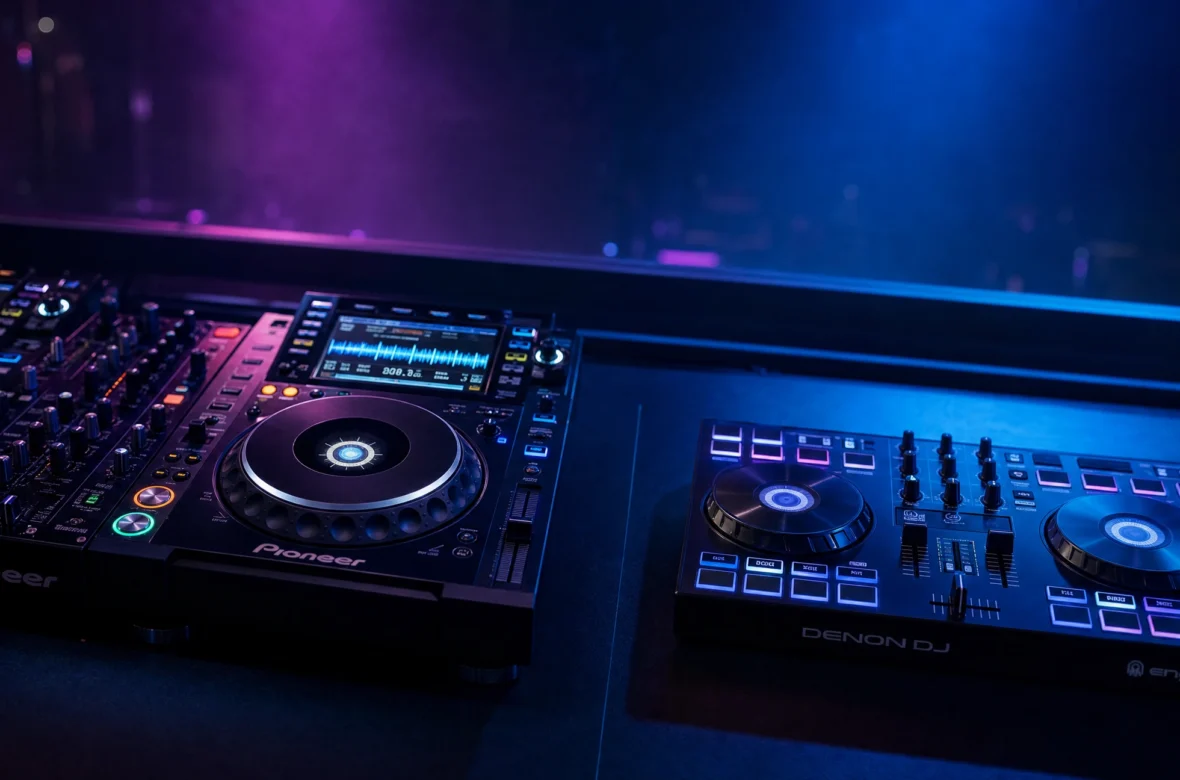
A DJ controller is an all-in-one device that controls DJ software (like rekordbox or Serato) running on your laptop. It combines jog wheels, a mixer, EQ, faders, and performance pads into a single piece of hardware, and connects to your laptop by USB. The laptop does the actual audio processing; the controller is the hands-on interface. It’s compact, affordable, and the standard way people learn — see my guide to the best DJ controllers for beginners for specifics.
What Are CDJs?
CDJs are standalone professional media players — the kind you’ll find in virtually every club booth in the world (the Pioneer CDJ-3000 is the current industry standard). The key difference: a CDJ needs no laptop and no software. You plug in a USB stick with your music prepared in rekordbox, and the CDJ reads and plays it directly, with its own screen and controls. A typical club setup is three separate pieces: two CDJs (one per deck) plus a mixer in the middle, all linked together. As We Are Crossfader explains, this modular setup is a big part of what makes the workflow feel different from an all-in-one controller.
The Key Differences
- Laptop: Controllers need one (the software runs there); CDJs don’t (they play from USB).
- Build: A controller is one all-in-one box; a CDJ setup is three pieces (two players + a mixer).
- Jog wheels: Most controllers use touch-capacitive jog wheels; CDJs have mechanical jog wheels that feel more like turntables — you’ll notice it when nudging tracks into sync.
- Price: Controllers range from cheap to high-end; a full CDJ-and-mixer club setup costs many times more.
- Portability: Controllers are light and travel easily; CDJ setups are heavy and usually live in venues.
- Workflow: Controllers give you your full laptop library and big stacked waveforms; CDJs work from exported USB drives with smaller individual screens, so preparation matters more.
Why CDJs Are the Club Standard
Walk into almost any established club or bar and the booth is already built around CDJs and a mixer. There’s a practical reason: a house setup means visiting DJs just plug in a USB and play — no setting up laptops, no compatibility headaches, total reliability night after night. This is why, if you want to play venues regularly, you’ll need to know your way around CDJs to get booked and to walk into a booth with confidence. It’s the shared language of professional DJing.
Which Should a Beginner Learn On?
Here’s the honest answer: start on a controller. Nearly every DJ does, and for good reason — they’re affordable, beginner-friendly, and teach the exact same fundamental skills (beatmatching, EQ, phrasing, transitions) that you’ll use on any gear. For practising at home, investing in a full CDJ setup simply isn’t necessary.
The crucial thing to understand: moving from a controller to CDJs later isn’t relearning how to DJ. It’s adapting to a different workflow and environment — USB drives instead of a laptop library, separate screens instead of stacked waveforms, mechanical jog wheels instead of capacitive ones. The underlying skills carry straight over. So learning on a controller and stepping up to CDJs when you start gigging is the normal, smart path. Don’t let anyone gatekeep you into spending club-gear money before your first transition.
How to Make the Switch Easier Later
A few habits while learning on a controller will make the eventual jump to CDJs almost seamless:
- Use rekordbox. Since CDJs read rekordbox-prepared USBs, prepping your library there at home means your music is already club-ready. (More in my rekordbox vs Serato guide.)
- Beatmatch by ear, not just sync. CDJs may not always be linked for sync, so train the manual skill — see how to beatmatch.
- Set proper cue points. CDJ workflow leans on well-organised tracks and hot cues, since you can’t lean on a big laptop screen.
- Practise without stacked waveforms occasionally. Get used to mixing by ear rather than eyeballing the laptop, so the smaller CDJ screens don’t throw you.
What About All-in-One Players Like the XDJ-RX3?
There’s a middle ground worth knowing about: all-in-one units like the Pioneer XDJ-RX3 combine the CDJ-style workflow (standalone, USB, no laptop, club-like layout) into a single integrated body. It’s what I play on — it gives you the screens, jog feel, and workflow close to club CDJs, but in one portable unit. For someone serious about playing venues, starting on something like this can smooth the transition even further, though it’s a bigger investment than an entry controller. For most beginners, a standard controller is still the right first step; an all-in-one is a great “I know I’m committed” upgrade.
A Note From NaJade
I learned the fundamentals on a controller and now play on an XDJ-RX3, and I can tell you the leap between them was never about skill — it was about getting used to a new layout and trusting my ears more. Everything I’d practised carried over. So if you’re staring at club CDJs feeling intimidated, don’t be: they’re just a different shaped version of what you already know. Learn on whatever you can afford today, build the real skills, and the gear stops mattering. The crowd never asks what you’re playing on — only whether it sounds good.
Wherever you’re starting, the skills are the same — work through my full guide on how to learn to DJ, and if you’d like hands-on guidance (on a controller or club-style gear), my DJ lessons run in person in Bangkok or online over Zoom.
Frequently Asked Questions About CDJs vs Controllers
What’s the difference between a CDJ and a controller?
Should a beginner learn on a CDJ or a controller?
Do CDJs need a laptop?
Is it hard to switch from a controller to CDJs?
Why do clubs use CDJs instead of controllers?
What is an all-in-one DJ system like the XDJ-RX3?
About the Author
NaJade is a Bangkok-based DJ playing progressive house, melodic EDM, pop, and Thai music across clubs, rooftops, and weddings in Thailand. He teaches beatmatching and mixing to beginners both in person in Bangkok and online over Zoom. When he’s not behind the decks, he’s documenting the journey on YouTube, Instagram, and TikTok.