
By NaJade · DJ in Bangkok · Published September 28, 2026
This guide is part of Denon DJ controllers & standalone systems: the complete range explained.
Denon’s most affordable standalone: club-style layout, built-in speakers, streaming, no laptop — at a genuinely beginner-friendly price. But is it the one you should buy? Here’s the honest verdict.
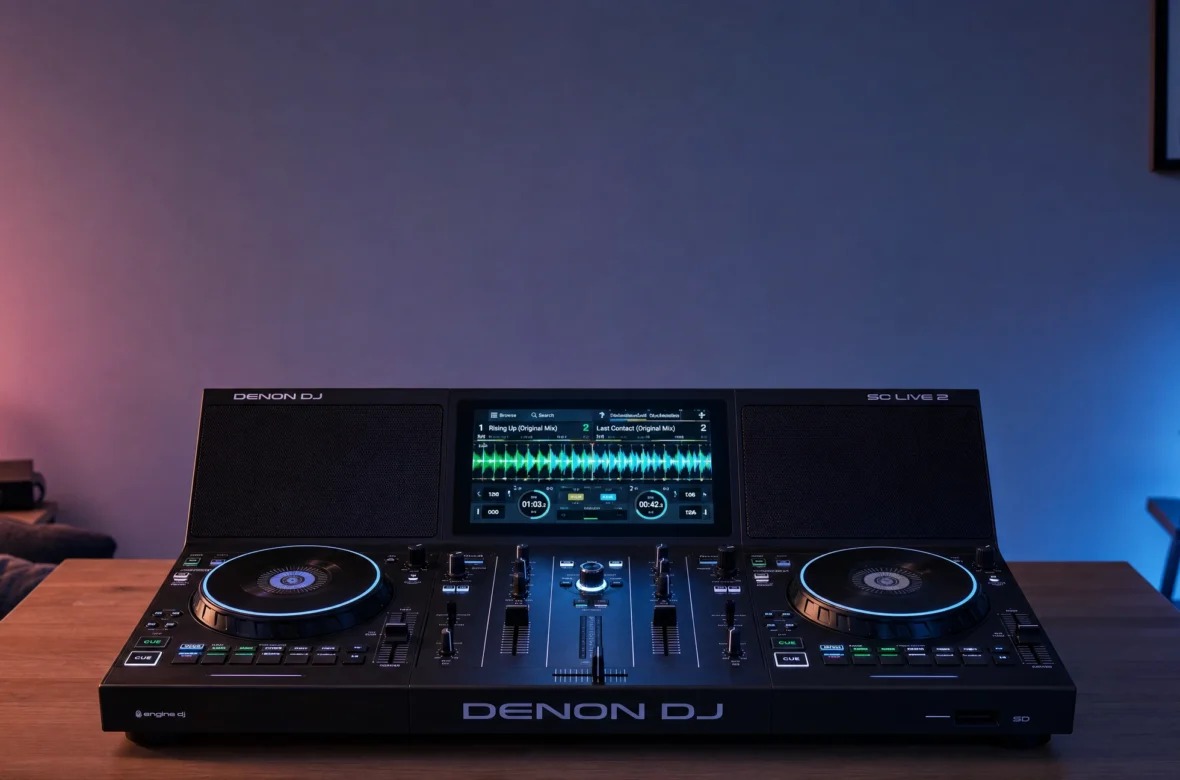
The Denon SC Live 2 is the entry point to the Engine OS world — a two-deck standalone system with built-in speakers, a 7″ touchscreen, Wi-Fi streaming, and a club-style layout, at the lowest price Denon has ever charged for a standalone. It’s the two-channel sibling of the SC Live 4, and it’s pitched squarely at bedroom practice, livestreaming, and small gigs. The value is genuinely impressive. But it also sits in an awkward spot in Denon’s own lineup, and that’s worth understanding before you buy. Here’s the honest picture.
The Denon SC Live 2 is the cheapest standalone Denon makes — a 2-deck system with built-in speakers, a 7″ touchscreen, Engine OS, Wi-Fi streaming (including Apple and Amazon Music), lighting control, and a Serato DJ Pro licence included. It’s excellent value for home practice, livestreaming, and small gigs. The catches: plastic build, only one mic input, no booth output, and it’s only ~$200 less than the 4-deck SC Live 4.
SC Live 2 at a Glance
The key specs and what they mean for you:
| Spec | SC Live 2 | What it means for you |
|---|---|---|
| Type | 2-deck standalone + built-in speakers | Switch on and play — nothing else needed |
| Screen | 7″ HD multi-gesture | Feels better proportioned here than on the Live 4 |
| Jog wheels | 6″ high-resolution | Good size; accurate for scrubbing and spinbacks |
| Pads | 4 per deck + Bank button (8 slots) | Half the physical pads of the SC Live 4 |
| FX | 4 Sweep FX + 13 BPM FX | Same club-style FX section as the Live 4 |
| Software | Engine OS; Serato DJ Pro licence included; Virtual DJ | Standalone or laptop — your choice |
| Streaming | Apple Music, Amazon Music, Beatport, Beatsource, SoundCloud GO+, TIDAL, Dropbox | 100M+ lossless tracks, no drive needed |
| Connectivity | 2 USB + SD, Bluetooth, 1 mic (TRS), XLR + RCA main | No booth out, no aux, single mic |
| Build / price | Plastic · ~$999 / £850–950 (check local) | Denon’s cheapest standalone |
(Prices vary by region and over time — confirm the current Thailand/local price before buying.)
Why the SC Live 2 Is Such Good Value
The headline here is what you get for the money. For substantially less than a Prime 2 — and less than Pioneer’s equivalents — you get full standalone operation (no laptop ever needed), the same Engine OS that powers the flagships, a big multi-touch screen, a proper mixer section between two large jogs, built-in speakers, Wi-Fi streaming from over 100 million lossless tracks, beat-synced lighting control, and a Serato DJ Pro licence in the box. That’s a genuinely semi-pro feature set at a beginner-friendly price. Reviewers have consistently called it hard to argue against on value alone.
What’s Great About the SC Live 2
Instant, Zero-Fuss Setup
The built-in speakers (with their own volume knob and on/off switch) plus onboard demo tracks mean you can switch it on and be mixing in seconds, with no monitors, no PA, no cables, no laptop. For daily practice at home, for livestreaming, or for content creation, that removes every excuse not to play — which genuinely makes you a better DJ. They can also serve as booth monitors alongside a main PA at a small gig, or simply be switched off.
A Layout That Prepares You for Real Gear
This is the clever bit. The mixer uses a 3-band full-kill EQ and Sweep FX knobs in the same arrangement as Denon’s X1800/X1850 club mixers, and the deck sections carry full-size pitch faders, looping controls, and 6″ jogs that are accurate enough for scrubbing, spinbacks, and scratching. It’s close enough to industry conventions that stepping up to professional gear later won’t surprise you — a real advantage over cheaper toy-like controllers.
Streaming, Lighting, and Serato Included
The SC Live line was the world’s first DJ hardware to support Amazon Music Unlimited, and it also streams Apple Music, Beatport, Beatsource, SoundCloud GO+, TIDAL, and Dropbox with fast onboard analysis — meaning you can genuinely perform a whole set without owning or prepping any music. It drives Philips Hue, Nanoleaf, and DMX lights beat-synced from the unit (perfect for streamers), supports Bluetooth in/out, and includes a Serato DJ Pro licence for when you do want a laptop.
What to Watch Out For
- It’s only ~$200 less than the SC Live 4. The awkward one. For that modest saving you give up two decks, half the physical pads, and connectivity — which makes the Live 4 the better buy for many.
- Thin connectivity. Just one mic input (versus two on the Live 4), no booth output, and no aux input. For weddings, bars, or anywhere you need two mics or a separate booth feed, that’s limiting.
- No external deck inputs. Like all SC Live units, you can’t connect turntables or CDJs — it’s a closed system.
- Plastic build. It feels well-made, but it’s plastic rather than the Prime range’s metal — closer to Numark gear in feel.
- Fewer physical pads. Four per deck, with a Bank button to reach slots 5–8, rather than eight dedicated pads.
- Cheaper alternatives exist. Numark’s Mixstream Pro runs the same Engine OS with speakers for considerably less — less capable, but remarkable value if budget is the priority.
- Not the club standard. Clubs run Pioneer, so this is a home/small-gig and practice machine.
The Honest Question: Live 2 or Live 4?
This deserves its own section, because it’s the decision you’re actually making. The SC Live 4 costs roughly $200 more and gives you four decks, eight pads per deck, jog displays, two mic inputs, an aux input, and a booth output. That’s a lot for $200. The honest reality is that the SC Live 2 makes most sense in three cases: your desk space is genuinely tight, your budget is truly capped, or you’re certain you’ll never want four decks. If none of those apply, the Live 4 is the better long-term buy. And if what you actually want is portability, neither is the answer — that’s the battery-powered Prime GO+.
Who the SC Live 2 Is Really For
It’s ideal for the beginner or bedroom DJ who wants a real, laptop-free, club-style system with speakers built in at the lowest possible Denon price — and for livestreamers and content creators who need instant setup and lighting control. It’s powerful enough for a bar, small party, or cocktail hour too. Skip it if you’ll want four decks (spend the extra on the Live 4), if you need two mics or a booth output for events (Live 4 or Prime 2), if you want portability (Prime GO+), or if you want a metal-built pro unit with an internal drive bay (Prime 2).
A Note From NaJade
I genuinely like what this unit does for new DJs. Standalone gear used to be a pro luxury, and the SC Live 2 puts a real, club-shaped, laptop-free system with speakers on a bedroom desk for a beginner-friendly price — and the layout mirrors proper club mixers, so you’re building the right habits from day one, not learning a toy. That matters. But I’ll give you the straight version: the $200 gap to the SC Live 4 is the thing to think hardest about. Two extra decks, double the pads, an extra mic, and a booth out for two hundred dollars is a lot of value, and I’d hate for you to save a little now and feel boxed in within a year. Buy the Live 2 if space or budget genuinely demand it — those are real reasons, and it’s a lovely machine. Otherwise stretch. And whichever way you go, the speakers will get you playing every single day, which is worth more than any spec on the box — because the crowd responds to your selection and your read of the room, and that only comes from hours behind the decks.
See the whole lineup in my complete Denon DJ range guide, or start with the best DJ controller for beginners. Want help learning to mix from scratch? My DJ lessons run in person in Bangkok or online over Zoom.
Frequently Asked Questions About the Denon SC Live 2
Is the Denon SC Live 2 good for beginners?
SC Live 2 vs SC Live 4: which should I buy?
Does the Denon SC Live 2 need a laptop?
Does the SC Live 2 have built-in speakers?
Denon SC Live 2 vs Prime 2: what’s the difference?
Can you connect turntables to the SC Live 2?
About the Author
NaJade is a Bangkok-based DJ playing progressive house, melodic EDM, pop, and Thai music across clubs, rooftops, and weddings in Thailand. He teaches beatmatching and mixing to beginners both in person in Bangkok and online over Zoom. When he’s not behind the decks, he’s documenting the journey on YouTube, Instagram, and TikTok.