
By NaJade · DJ in Bangkok · Published September 28, 2026
This guide is part of Pioneer DJ controllers: the complete range explained.
AlphaTheta just dropped a brand-new, cheapest-ever standalone aimed squarely at controller DJs ready to level up. Streaming, cloud, and wireless monitoring at $1,200 — but with some pointed compromises. Here’s the honest first look.
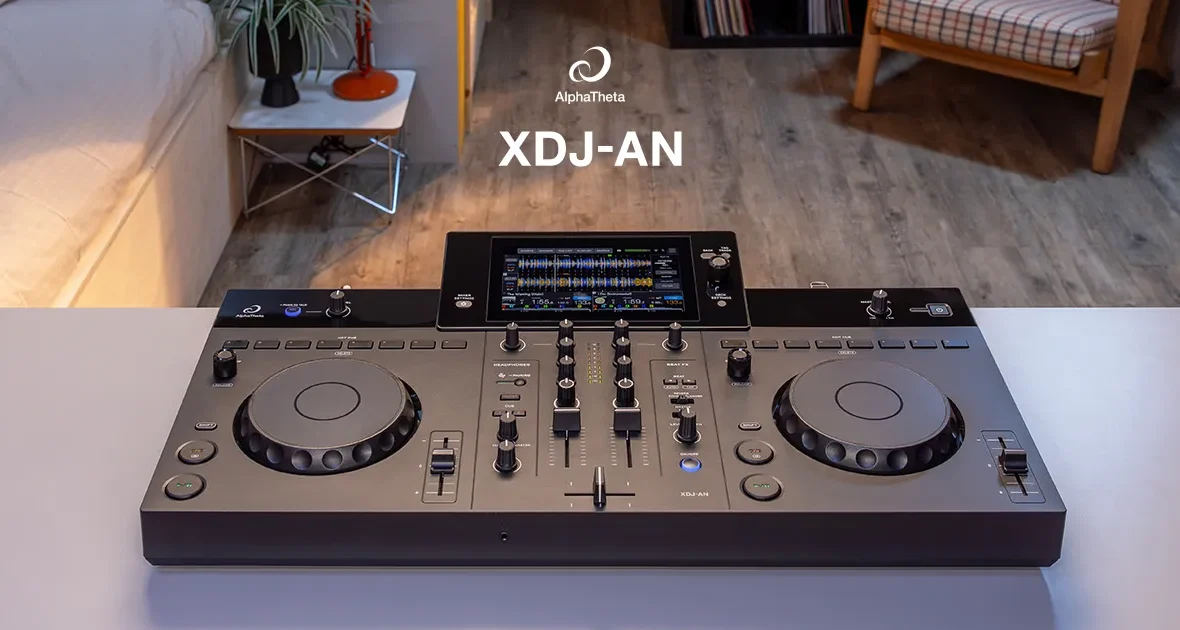
Announced in July 2026, the XDJ-AN is AlphaTheta’s (formerly Pioneer DJ) newest all-in-one — and now the most affordable standalone system in the entire range. It’s built for one very specific job: to be the bridge from a home controller to a club-style booth, without spending CDJ money. It revives the slot left empty by the long-discontinued XDJ-RR, but adds the things that define modern DJing — streaming, cloud libraries, and wireless monitoring. It’s an exciting release, but AlphaTheta cut some real corners to hit the price. Since it’s brand new, this is a specs-and-positioning first look (I’ll update it once I’ve had hands-on time), but the picture is already clear. Here’s who it’s for — and who should look elsewhere.
The XDJ-AN is AlphaTheta’s new cheapest standalone (~$1,200 / £999), a 2-channel all-in-one built to bridge home controllers and club booths. Its headline features are built-in streaming (Apple Music, Beatport, Tidal), rekordbox CloudDirectPlay, and SonicLink wireless monitoring. The catches: it takes USB-C drives only (one slot), has no booth output or line/phono inputs, only 3 Beat FX, and a small 7-inch screen. Great for a controller DJ stepping up at home — less so for bar, mobile, or back-to-back DJs.
XDJ-AN at a Glance
The key specs and what they mean for you:
| Spec | XDJ-AN | What it means for you |
|---|---|---|
| Type | 2-channel standalone all-in-one | Play with no laptop; club-style layout |
| Price | ~$1,200 / £999 (check local price) | The cheapest standalone AlphaTheta makes |
| Released | July 2026 (replaces the XDJ-RR) | Brand new; modern feature set |
| Screen | 7″ touchscreen | Compact; smaller than the RX3/AZ |
| Software | rekordbox (HW unlock), Serato DJ Lite free / Pro paid, djay; + rekordbox/djay for iOS | Broad support; first all-in-one to run mobile apps over USB-C |
| Streaming / cloud | Apple Music, Beatport, Tidal (Spotify later), rekordbox CloudDirectPlay | Play from the cloud; huge library access |
| Wireless | SonicLink (9 ms), Bluetooth in/out, Wi-Fi | Cable-free monitoring with HDJ-F10 |
| Drive storage | 1 × USB-C only (no USB-A) | Big catch: one drive, USB-C only |
| Outputs / FX | XLR + RCA master, 3.5mm headphone; 3 Beat FX | No booth out; limited effects |
(Prices vary by region and over time — confirm the current Thailand/local price before buying.)
What the XDJ-AN Is Really For
Understanding the AN’s purpose is the key to judging it fairly. It is not trying to out-spec AlphaTheta’s pricier units — it’s built for one person: the controller DJ who’s outgrowing their gear and wants to practise at home on something that behaves like a club booth, without paying for an RX3 or a flagship. If you started on a DDJ-FLX4 and you’re hungry for a standalone, club-style workflow — playing from USB, cloud, or streaming with no laptop — this is aimed directly at you, at the lowest price AlphaTheta has ever offered for it. Judge it against that brief, not against a flagship, and it makes a lot of sense.
The Headline Features
Streaming and Cloud, Built In
This is the AN’s biggest selling point and the thing the old XDJ-RR never had. It streams directly from Apple Music, Beatport Streaming, and Tidal (Spotify is coming in a later update), pulls from a synced rekordbox cloud library via CloudDirectPlay, and can even run rekordbox or djay’s mobile apps over USB-C — meaning a phone-centric DJ could perform from just their phone. You can also create and edit playlists and hot cues right on the unit, and have them sync back to the cloud. For a modern DJ who thinks of their library as living in the cloud rather than a folder of files, this is genuinely powerful at the price.
SonicLink Wireless Monitoring
The AN has AlphaTheta’s proprietary SonicLink built in — ultra-low-latency wireless headphone monitoring at around 9 milliseconds, so you can cue cable-free without the lag that makes normal Bluetooth useless for DJing. It works with compatible headphones like the new HDJ-F10. There’s also Bluetooth in/out (handy for playing a warm-up track from a phone) and dual-band Wi-Fi. Wireless is a genuine strong point here.
A Club-Style Layout at the Lowest Price
The layout takes cues from AlphaTheta’s club-standard CDJ and DJM gear, so the muscle memory you build transfers toward a real booth — the whole point of the unit. Be realistic, though: reviewers note the jog feel and short pitch-fader throw are actually closer to a DDJ-FLX4 controller than to true club decks. It looks the part and builds the right reflexes, but it doesn’t feel like a CDJ-3000.
What to Watch Out For
This is where AlphaTheta cut costs, and some of it is pointed. Know these before you buy:
- USB-C drives only — and just one slot. There are no USB-A ports at all. Most working DJs’ drives are USB-A, so you’ll likely need a new USB-C drive or an adapter on day one. And with a single drive slot, back-to-back sets (swapping media with another DJ) are awkward.
- No booth output. You get XLR and RCA master outs plus a headphone jack, but no independent booth-level output — a real miss for many bar and club situations.
- No line or phono inputs. Nothing external plugs in — no turntable, no second player, no aux. It’s a closed box beyond USB, mobile, and streaming.
- Only 3 Beat FX. Reverb, Echo, and Flanger — the same basic set the RR had a decade ago, well short of the effects on pricier units.
- Small 7″ screen and small (132mm) jogs. The screen is compact and gets crowded now that many controls (Vinyl Mode, Quantise, Slip, Master Tempo) live on it; the jogs are far smaller than club decks.
- Headphone jack is 3.5mm only. Pro headphones with a fixed 1/4″ plug will need an adapter.
- No wired LAN; cloud can be flaky. Streaming leans entirely on venue Wi-Fi (famously unreliable), with no Ethernet fallback, and rekordbox CloudDirectPlay is still maturing — keep a USB backup for paid gigs.
- No onboard Stems. Stem separation only works when connected to a laptop running software like Serato DJ Pro.
XDJ-AN vs XDJ-RX3: The Real Dilemma
This is the comparison most buyers will wrestle with, because both are 2-channel standalones. It’s a genuine trade-off between modern features and cheaper price (AN) versus pro I/O and a more established feel (RX3):
- The AN wins on: price (~$1,200 vs ~$2,269), streaming, cloud sync, SonicLink wireless, mobile-app support, and size.
- The XDJ-RX3 wins on: a bigger 10.1″ screen, larger jog wheels, dual USB-A slots (easy back-to-backs), a booth output, and line/phono inputs — it’s the more “professional” and connectable unit, just on older tech with no streaming or SonicLink.
Simply put: if you want the newest streaming/cloud/wireless features at the lowest price and mostly play solo from USB or the cloud, the AN is compelling. If you need pro connectivity — booth monitoring, external decks, easy B2B — the older, pricier RX3 is still the better tool. It’s worth noting an “XDJ-AX” style modern refresh of the RX3 slot may well come next, if you can wait.
Where It Sits in the Range
- vs DDJ-FLX4: The AN is the standalone step up from a beginner controller — no laptop needed, club-style layout, streaming. If you’ve outgrown the FLX4, this is the natural next rung.
- vs XDJ-AZ (flagship): The AZ is the ~$3,449 four-channel flagship with a 10.1″ screen, CDJ-3000 jogs, 14 Beat FX, LAN, and Pro DJ Link. The AN is under a third of the price and a different tier — don’t expect flagship capability.
- vs XDJ-XZ / OPUS-QUAD: Those are larger, pricier 4-channel standalones for serious setups. The AN is the compact, budget, 2-channel entry into the standalone world.
Who Should Buy the XDJ-AN?
Buy it if you’re a home or hobby DJ who’s outgrown a controller and wants an affordable, laptop-free, club-style system with modern streaming and cloud features — and you mostly play two decks on your own. It’s a brilliant bedroom-to-booth stepping stone. Skip it if you’re a bar or mobile DJ who needs booth output or external inputs, if you play back-to-back often (one drive slot), if you’re a scratch DJ (small jogs, short fader), or if your whole music library lives on USB-A drives and you don’t want the adapter hassle. In those cases, the XDJ-RX3 or a larger standalone is the better fit.
A Note From NaJade
As a standalone DJ myself, I’m genuinely happy this exists — a laptop-free, club-shaped machine with real streaming and cloud smarts at this price lowers the barrier for a lot of people, and that’s a good thing. If you’re sitting on a controller dreaming of a proper booth workflow, the AN is the most affordable door AlphaTheta has ever opened. But I want you to go in with clear eyes, because the cost-cutting is deliberate and it’ll bite the wrong buyer. That USB-C-only, single-slot storage is the one I’d think hardest about — if your library is on USB-A sticks, or you ever play back-to-back, that decision alone could frustrate you at every gig. And the missing booth output and inputs mean this is a home-and-small-setup unit, not a do-everything one. So be honest about how you actually play: if you’re a solo, home-based, streaming-era DJ, this is a lovely, affordable step up; if you need pro connectivity, spend up to an RX3 or wait to see what comes next. Either way, don’t let the shiny new features distract you from the boring stuff — ports, outputs, and how you load your music are what you’ll live with every night. And as always, the crowd responds to your selection and your read of the room, never to how new your gear is.
Compare it with the rest of the lineup in my complete Pioneer & AlphaTheta DJ controller guide, or the wider DJ gear for beginners series. Unsure whether to step up from your controller yet? My DJ lessons run in person in Bangkok or online over Zoom.
Frequently Asked Questions About the XDJ-AN
What is the AlphaTheta XDJ-AN?
How much is the XDJ-AN and when was it released?
Does the XDJ-AN really only take USB-C drives?
XDJ-AN vs XDJ-RX3: which should I buy?
Does the XDJ-AN work with rekordbox and Serato?
Is the XDJ-AN good for beginners?
About the Author
NaJade is a Bangkok-based DJ playing progressive house, melodic EDM, pop, and Thai music across clubs, rooftops, and weddings in Thailand. He teaches beatmatching and mixing to beginners both in person in Bangkok and online over Zoom. When he’s not behind the decks, he’s documenting the journey on YouTube, Instagram, and TikTok.