
By NaJade · DJ in Bangkok · Published October 20, 2026
This guide is part of DJ mixers: the complete guide.
Half the “my speakers are buzzing” messages I get are cable problems.
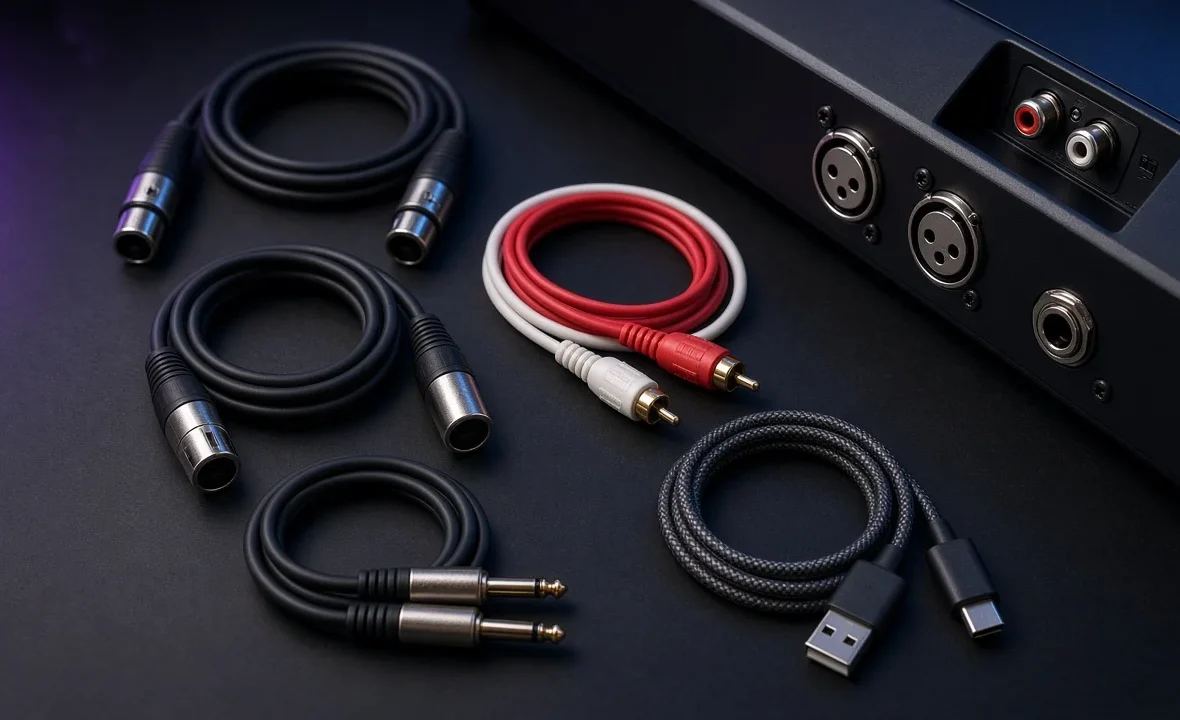
Nobody gets excited about cables, but they decide whether your expensive controller sounds clean or hums all night. DJ setups use a handful of connector types, and each one has a job: some carry audio over long distances without noise, some only belong on short runs at home, and some carry data rather than sound. Learn the four main ones and you can walk into almost any booth, home studio or wedding hall and connect yourself without guessing.
Use balanced XLR or TRS cables from your mixer or controller to speakers — they reject noise over long runs. RCA is unbalanced and fine for short connections like turntables or home monitors. USB carries data between laptop and controller, not sound to speakers. Always carry spares of each, plus adapters.
The Four Connectors Every DJ Meets
| Connector | Balanced? | Typical DJ use | Run length |
|---|---|---|---|
| XLR (3-pin, locking) | Yes | Master out to PA speakers, microphones | Long runs are fine |
| TRS jack (6.35 mm, two black rings) | Yes | Booth out, monitors, some master outs | Long runs are fine |
| TS jack (6.35 mm, one ring) | No | Instruments, some older gear | Keep short |
| RCA (phono, red/white) | No | Turntables, CDJ to mixer, home speakers | Keep short, ideally under ~3 m |
| USB-A/B/C | Data | Laptop to controller, audio interface | Short; under ~3 m |
There is also the 3.5 mm mini-jack for headphones and phones, and the 6.35 mm headphone jack on mixers. A screw-on 3.5-to-6.35 mm adapter belongs in every DJ bag.
Balanced vs Unbalanced, in Plain English
A balanced cable carries the signal twice — once normal, once flipped upside down — plus a ground. Any noise picked up along the cable hits both copies equally, and the receiving device cancels it out when it flips one back. That is why XLR and TRS can run 20 metres across a venue without humming.
An unbalanced cable (RCA, TS) carries the signal once plus ground. It works perfectly over short distances, but the longer it gets, the more hum and interference it collects. Sweetwater’s explainer on balanced vs unbalanced audio goes deeper if you want the theory.
Important: a cable is only balanced if both ends are balanced. An XLR cable plugged into an unbalanced RCA output via an adapter is still an unbalanced connection.
Which Cable Goes Where
| Connection | Best cable | Notes |
|---|---|---|
| Controller/mixer to PA speakers | XLR to XLR | Use the master XLR outs whenever they exist |
| Controller to studio monitors | TRS to TRS, or XLR to TRS | Booth out or master out, depending on the unit |
| Controller with RCA only to monitors | RCA to TRS/TS | Fine at home; keep it short |
| Turntable to mixer | RCA (phono) plus ground wire | Connect the ground lead or it will hum |
| CDJ to mixer | RCA, sometimes digital coaxial | Club booths are usually pre-wired |
| Laptop to controller | USB (A-to-B or USB-C) | Use the cable that came with it if possible |
| Mixer to recorder or interface | RCA or TRS from the record/booth out | See how to record a DJ mix |
For the full walkthrough of hooking up speakers, see how to connect a DJ controller to speakers and how to set up a PA system. For choosing monitors, start with studio monitors for DJs.
Buying Cables Without Wasting Money
- Mid-priced is the sweet spot. Expensive “audiophile” cables do not make a DJ setup sound better. Cheap ones do fail — usually at the connector.
- Look for solid connectors and strain relief where the cable meets the plug. Neutrik-style XLR and jack plugs last for years.
- Buy the length you need, plus a bit. Excess cable coiled behind speakers is just more to trip on; too short means stretched connectors.
- Label both ends. Coloured tape or Velcro ties save time when you are packing down in the dark.
- Coil over-under, not around your elbow. It stops internal wires from twisting and breaking.
Sweetwater’s cable buying guide is a good visual reference for identifying connectors.
The Gig Cable Kit
- 2 × XLR cables (5 m or longer)
- 2 × TRS cables, or XLR-to-TRS
- 1 × RCA-to-RCA and 1 × RCA-to-TRS or RCA-to-XLR
- Spare USB cable for your controller (and a USB-C adapter for your laptop)
- 3.5-to-6.35 mm headphone adapter
- Gaffer tape and a power strip
That fits in a pouch and covers almost any venue. The rest of the bag is in what to bring to a DJ gig. And if your system sounds distorted rather than noisy, the problem is likely levels, not cables — read gain staging for DJs.
A Note From NaJade
At private events in Bangkok I have walked into rooms where the “sound system” was two speakers and a tangle of RCA cables running thirty metres under the carpet. It hummed before I played a note. A pair of my own XLR cables fixed it in five minutes, and that is why they live in my bag permanently. Cables are boring until the moment they are the only thing that matters. My habit now is simple: I pack a spare of everything I need to connect my own gear, plus one adapter for every connector I might find in the venue. It costs very little and it has saved more than one gig.
Related: DJ mixers guide, home DJ setup guide, connecting a controller to speakers, and what to bring to a DJ gig.
Frequently Asked Questions
What cables do I need to connect a DJ controller to speakers?
Is XLR better than RCA for DJing?
What is the difference between TRS and TS cables?
Why are my DJ speakers buzzing or humming?
Do expensive audio cables sound better?
What cables should a DJ bring to a gig?
About the Author
NaJade is a Bangkok-based DJ playing progressive house, melodic EDM, pop, and Thai music across clubs, rooftops, and weddings in Thailand. He teaches beatmatching and mixing to beginners both in person in Bangkok and online over Zoom. When he’s not behind the decks, he’s documenting the journey on YouTube, Instagram, and TikTok.