
By NaJade · DJ in Bangkok · Published September 29, 2026
The controller everyone recommends to beginners — honest thoughts from a working DJ on whether it lives up to the hype.
If you’ve researched your first controller for more than five minutes, you’ve hit the same name on repeat: the Pioneer DDJ-FLX4. It’s the default recommendation in forums, tutorials, and shops worldwide — including in nearly every gear guide I’ve written. But “everyone recommends it” isn’t the same as “it’s right for you.” So here’s my honest review: what it does well, where it falls short, and who should buy it.
The DDJ-FLX4 is the best beginner controller for most people in 2026: affordable, dual-software, and built with a club-standard layout that means the skills you learn transfer straight to professional gear. Its only real weaknesses are minor — a slightly cramped, plasticky build and clicky buttons.
What Is the DDJ-FLX4?
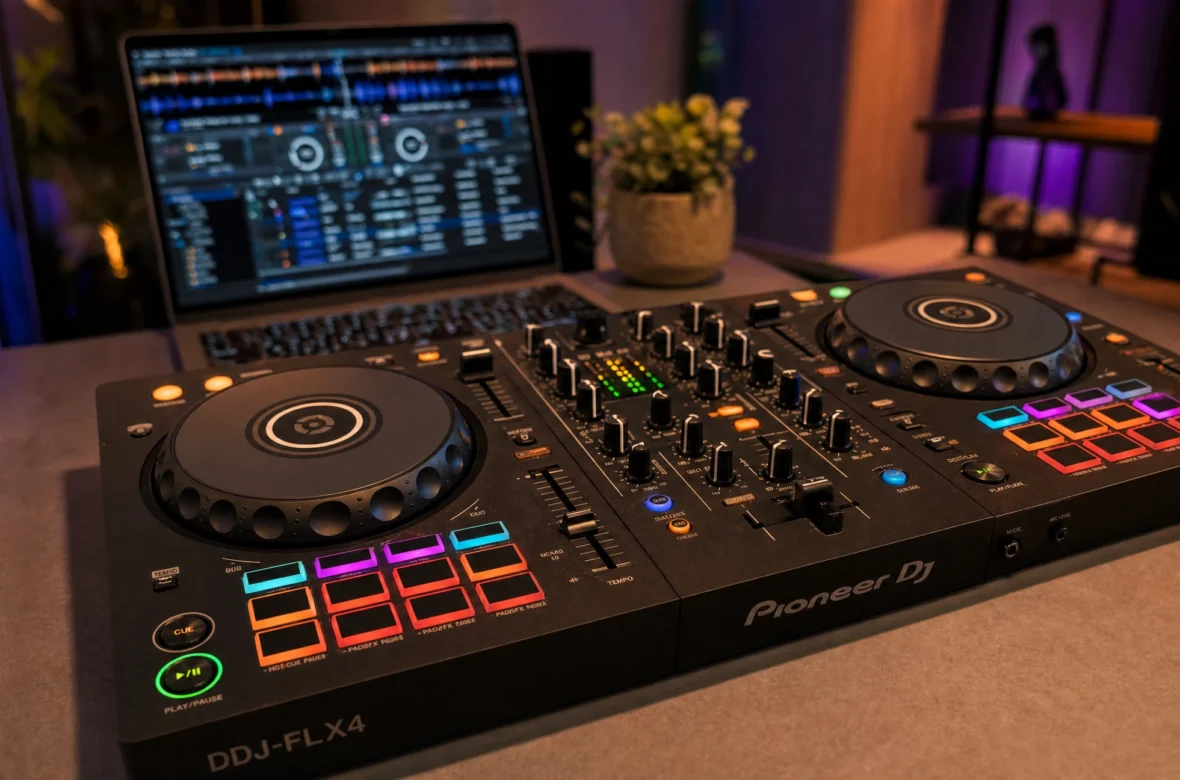
The DDJ-FLX4 is a two-channel (four-deck-capable) DJ controller from Pioneer DJ — now AlphaTheta — positioned as the entry point into their ecosystem. It replaced the hugely popular DDJ-400, and if you’ve heard people rave about the 400, the FLX4 is essentially its smarter successor. It connects to a laptop via USB-C (bus-powered, no separate adapter needed) and drives free DJ software. As Pioneer DJ’s official page notes, the control layout is inherited from their professional gear — which is the single biggest reason it’s such a smart first buy.
The Good: What It Does Well
- Club-standard layout. The mixer and deck layout mirrors Pioneer’s club gear (CDJs and DJM mixers), so the muscle memory you build transfers directly when you step up to CDJs. This is the FLX4’s killer feature.
- Dual (actually quad) software support. It works with rekordbox and Serato DJ Lite for free, plus djay and Traktor Play — so you’re never boxed into one ecosystem.
- Genuinely beginner-friendly features. “Smart Fader” auto-handles tempo, EQ, and effects during a transition (a training-wheels assist), and “Smart CFX” triggers effect combos with one knob. Useful while learning, easy to outgrow.
- Full feature set. Full-size jog wheels, 8 performance pads (hot cues, pad FX, beat jump, sampler), 3-band EQ per channel (with full-kill in software), and a built-in sound card so it connects straight to speakers with one cable.
- Portable and bus-powered. Light, compact, and powered over USB — easy to carry to a friend’s or a gig.
The Not-So-Good: Honest Drawbacks
- Mostly plastic build. It feels solid for the price, but it’s mostly plastic — nothing flimsy, just not premium metal. Entirely acceptable at this tier.
- A little cramped. As with any compact controller, the layout is tight. You’ll have no trouble reaching everything, but it’s smaller than club gear.
- Clicky buttons. The most common gripe (and one I share) — the performance pads and buttons feel a touch clicky. Minor, and you stop noticing it.
- Not for advanced needs. If you want four physical decks, advanced FX routing, or built-in screens, you’ll outgrow it — but that’s not who it’s for.
Is the Smart Fader Cheating?
A fair question, since the FLX4 leans on “smart” auto-mixing features. My take: they’re fine as training wheels, but don’t lean on them. Smart Fader can make a clean-sounding transition for you, which is encouraging on day one — but the goal is to learn to beatmatch by ear and mix manually, because that’s the skill that actually makes you a DJ. Use the smart features to get hooked, then switch them off and learn properly. The good news: the FLX4 lets you do both.
Who Should Buy It?
Buy the FLX4 if you’re a beginner, hobbyist, or student who wants to learn on gear that prepares you for club setups — or a pro wanting a cheap, portable second controller. For the overwhelming majority of people starting out, it’s the right call.
Look elsewhere if you specifically need four physical decks or advanced routing (step up the FLX range), or you’re certain you want a standalone, laptop-free club-style workflow now (consider an all-in-one like the XDJ-RX3). Those are bigger investments for a minority of beginners.
The Verdict
The DDJ-FLX4 earns its reputation. It removes almost every barrier to starting: it’s affordable, the dual software support means you’re never boxed in, and the club-standard layout means your skills transfer. The drawbacks — plasticky build, clicky buttons — are minor and expected at this price. As both a teaching tool and a first controller, it’s genuinely hard to beat in 2026. If you’re choosing your first controller and feeling overwhelmed, you won’t go wrong here.
A Note From NaJade
I recommend the FLX4 constantly, and it’s not lazy advice — it’s genuinely the controller I’d hand a friend who wanted to start tomorrow. The layout mirroring club gear is the real reason: I’ve watched students go from this to a club CDJ setup and barely skip a beat, because the muscle memory carries. Yes, the buttons are a little clicky, and no, it’s not built like a tank — but none of that matters when you’re learning. It does the one thing a first controller must do: it gets out of the way and lets you learn. That’s worth more than any premium feel.
If the FLX4 sounds right, see how it fits a full rig in my home DJ setup guide and where to get it locally in where to buy DJ gear in Bangkok. Then start learning with how to learn to DJ. Want a guided start? My DJ lessons run in person in Bangkok or online over Zoom — and the FLX4 is exactly what I teach beginners on.
Frequently Asked Questions About the DDJ-FLX4
Is the Pioneer DDJ-FLX4 good for beginners?
What software does the DDJ-FLX4 work with?
What’s the difference between the DDJ-FLX4 and the DDJ-400?
Does the DDJ-FLX4 need a laptop?
Can you play real gigs on a DDJ-FLX4?
What are the downsides of the DDJ-FLX4?
About the Author
NaJade is a Bangkok-based DJ playing progressive house, melodic EDM, pop, and Thai music across clubs, rooftops, and weddings in Thailand. He teaches beatmatching and mixing to beginners both in person in Bangkok and online over Zoom. When he’s not behind the decks, he’s documenting the journey on YouTube, Instagram, and TikTok.