
By NaJade · DJ in Bangkok · Published July 14, 2026
This guide is part of Pioneer DJ controllers: the complete range explained.
The tiny controller that started the smartphone-DJ trend — but in 2026, is it still the one to buy? An honest look at the DDJ-200.
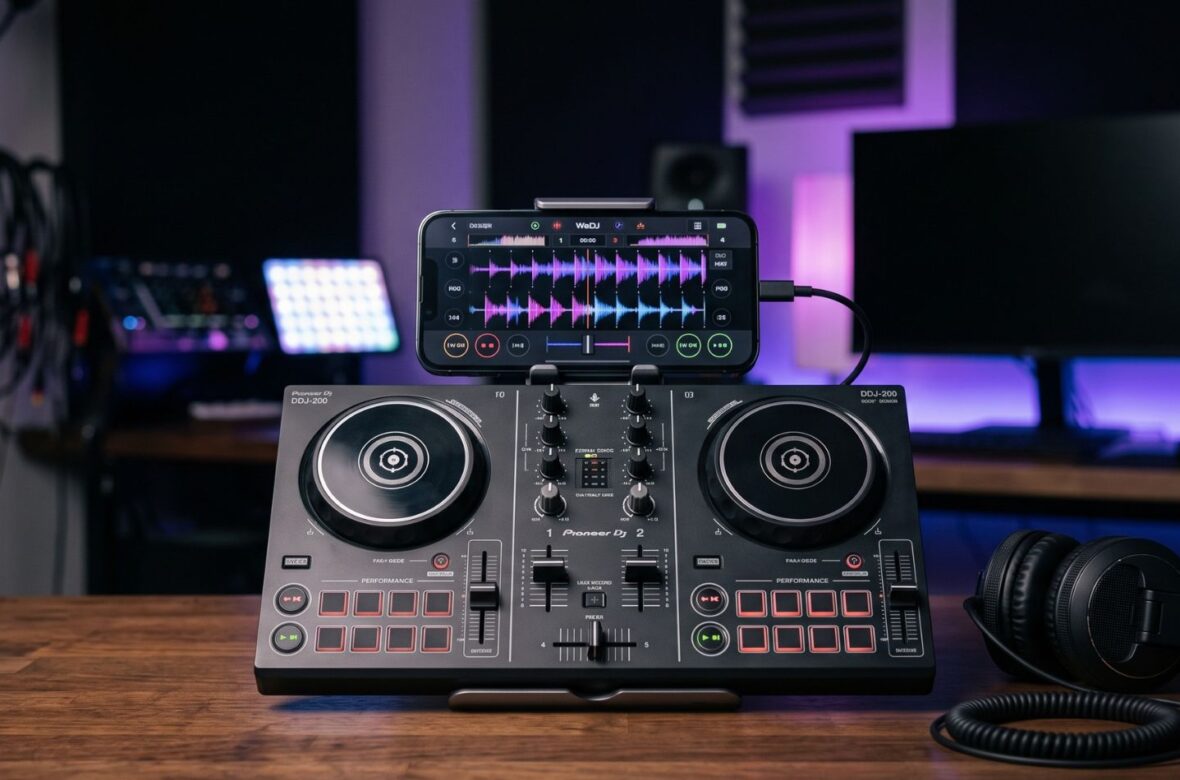
The DDJ-200 was a genuinely clever idea: the smallest, cheapest Pioneer controller ever, designed to turn your phone into a DJ setup over Bluetooth. It got a lot of beginners started. But it has one significant limitation — and Pioneer has since released a controller (the FLX2) that fixes exactly that. So the real question isn’t “is the DDJ-200 good?” but “should you still buy it today?” Here’s an honest overview.
The DDJ-200 is Pioneer’s smallest, cheapest controller — a lightweight, Bluetooth, smartphone-focused unit aimed at total beginners. Its big limitation is no built-in soundcard, so it relies on a mono split-cable workaround for headphone monitoring. Because the newer DDJ-FLX2 fixes exactly that at a similar price, most beginners today should choose the FLX2 instead — unless you find a DDJ-200 very cheap for casual phone mixing.
DDJ-200 at a Glance
The key specs and what they mean for a beginner:
| Spec | DDJ-200 | What it means for you |
|---|---|---|
| Channels | 2 | Standard two-deck beginner mixing |
| Connection | Bluetooth MIDI or USB | Wirelessly control your phone; USB for laptop |
| Built-in soundcard | No | The key drawback — no true audio interface |
| Audio output | Mono split-cable workaround | Headphone cueing works, but quality is limited |
| Mic input | No | Can’t plug in a mic |
| Gain knobs | None (software auto-gain) | Levels handled in the app, not on the unit |
| Main app | WeDJ (also rekordbox, djay, edjing) | Beginner-friendly with tutorials + streaming |
| Power / build | USB bus-powered, plastic (~3.75 lb) | Runs off a power bank; ultra-portable |
| Layout | Pro-style 2-deck + mixer | Familiar layout despite tiny size |
(Pricing varies by region and it’s an older model — confirm current local availability and price before buying.)
The Catch: No Built-In Soundcard
This is the single most important thing to understand. The DDJ-200 has no audio interface of its own — it’s essentially a remote control for the DJ software on your phone or laptop, which does all the actual audio processing. To monitor your next track in headphones, you use an included mono split cable from your device’s headphone jack. It works, and it’s clever for the price, but the audio quality is limited and it’s less robust than a real soundcard. This is exactly the limitation the newer DDJ-FLX2 was built to solve.
What’s Good About the DDJ-200
Tiny, Cheap, and Portable
It’s the smallest and lightest Pioneer controller, runs on USB bus power (even from a portable battery), and fits anywhere. For mixing on the go, at a friend’s place, or in a tiny room, the portability is genuinely appealing — and the pro-style layout means you still learn the standard deck-and-mixer arrangement.
Smartphone Mixing Made Easy
The Bluetooth connection sends MIDI (not audio), so it’s responsive with very little lag on the controls, and it pairs neatly with the beginner-friendly WeDJ app. The tutorials and pop-hints genuinely help newcomers understand the basics, and streaming support (Beatport, SoundCloud, TIDAL, and more depending on app) means you can start without a big music library.
Beginner Assist Features
Phrase Sync and Transition FX (in-app) automate a lot of the tricky parts of mixing, so you can get a decent-sounding blend on day one. As with all such features, treat them as training wheels — lean on them to have fun early, but still learn to beatmatch properly.
What to Watch Out For
- No real soundcard. Audio quality depends on your phone/laptop, and the split-cable setup is a compromise.
- No mic input and no RCA outs. Not suited to hosting or connecting cleanly to a proper PA — it’s a home/casual tool.
- No gain knobs on the unit. Levels are software-controlled; set them carefully to avoid sudden loud volume.
- Bluetooth lag with un-synced tracks. Some reviewers found beatmatching un-quantized tracks over Bluetooth tricky; sync helps.
- Minor build quibbles. All-plastic, and some units have had loose knobs.
- Largely superseded. The FLX2 offers a real soundcard for a similar price — the big reason to think twice.
DDJ-200 vs DDJ-FLX2: The Key Decision
This is the comparison that really matters, because the two are close in price and size. The DDJ-FLX2 is the DDJ-200’s spiritual successor and fixes its biggest flaw by adding a built-in soundcard, plus improved Smart features and wider software support. Unless you can find a DDJ-200 significantly cheaper (or already own one), the FLX2 is the smarter buy today.
- Consider the DDJ-200 if: you find it very cheap, want the absolute lightest phone-mixing toy, or just want to try DJing casually with minimal outlay.
- Choose the FLX2 (or FLX4) if: you’re serious about learning — the real soundcard, better audio, and room to grow make either a better foundation. See the DDJ-FLX4 if you can stretch further.
Who the DDJ-200 Is Really For
In 2026, it’s a niche pick: someone who wants the cheapest, tiniest possible way to mess around with DJing on their phone, and who isn’t fussed about audio quality or growing fast. For anyone serious about learning — or who might play for others — the FLX2 or FLX4 are better first controllers. If you already own a DDJ-200, it’s still perfectly fine for learning the fundamentals; there’s no need to rush to replace it.
A Note From NaJade
I have real affection for the DDJ-200, because it did something important: it made DJing feel possible for people who thought they needed a fortune in gear. Turning a phone into a mixer for pocket money is a genuinely lovely on-ramp. But I have to be honest with you the way I would with a student — the arrival of the FLX2 changed the maths. When a controller at a similar price gives you a proper soundcard (which actually matters for learning to hear and blend your mix), it’s hard to recommend the older unit to a fresh buyer. So: if a DDJ-200 lands in your lap cheap, brilliant, start learning today and don’t overthink it. But if you’re spending money fresh in 2026, put it toward the FLX2 or FLX4. As always, the gear is just the doorway — what turns you into a DJ is the hours you put in behind it.
Compare it with the rest of the lineup in my complete Pioneer DJ controller guide, or the wider DJ gear for beginners series. Ready to start learning? My DJ lessons run in person in Bangkok or online over Zoom.
Frequently Asked Questions About the DDJ-200
Is the DDJ-200 still worth buying in 2026?
Does the DDJ-200 have a built-in soundcard?
Can you connect the DDJ-200 to speakers?
What app should I use with the DDJ-200?
Does the DDJ-200 work over Bluetooth?
DDJ-200 or DDJ-FLX2 for a beginner?
About the Author
NaJade is a Bangkok-based DJ playing progressive house, melodic EDM, pop, and Thai music across clubs, rooftops, and weddings in Thailand. He teaches beatmatching and mixing to beginners both in person in Bangkok and online over Zoom. When he’s not behind the decks, he’s documenting the journey on YouTube, Instagram, and TikTok.