
By NaJade · DJ in Bangkok · Published September 28, 2026
This guide is part of Denon DJ controllers & standalone systems: the complete range explained.
An SC6000 without the screen — an expansion controller that unlocks the second layer of your Denon players, or works as a standalone controller for Serato and Virtual DJ. Here’s the honest verdict.
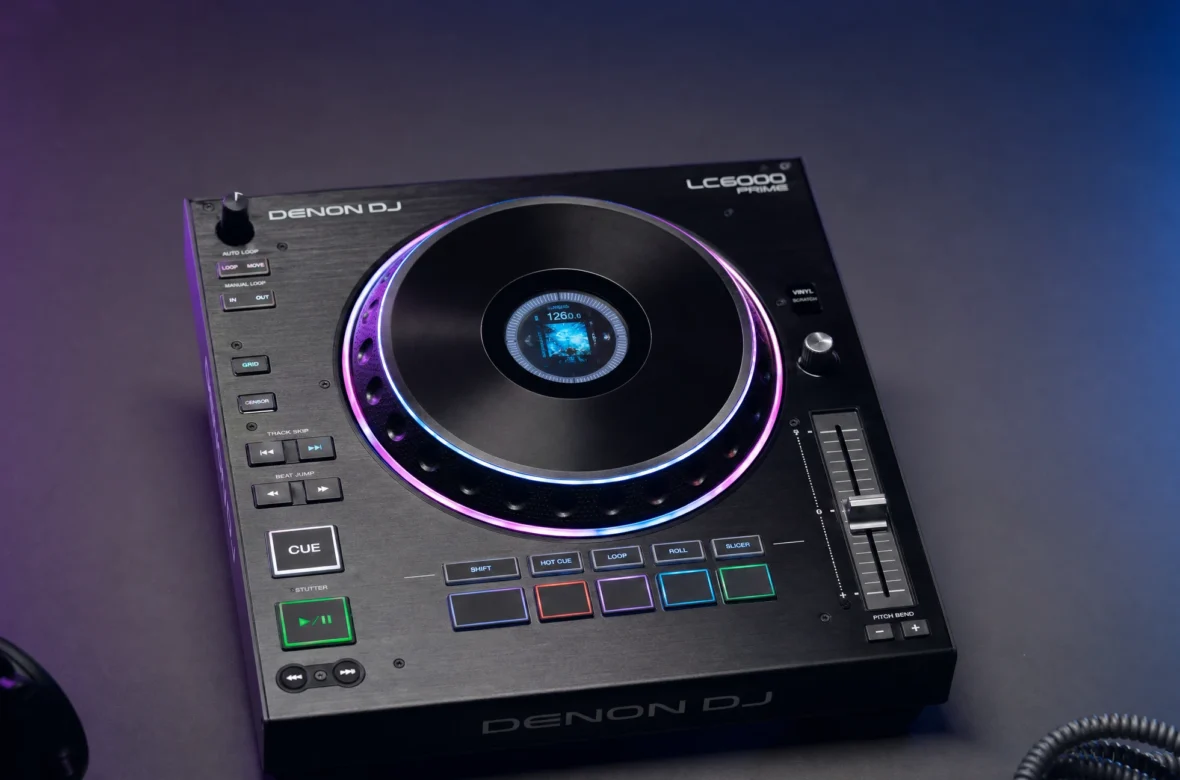
The Denon LC6000 Prime is the clever, often-misunderstood piece of the range. It looks like an SC6000 with the screen removed — because that’s essentially what it is. Its job is to give you physical, hands-on control of the second layer of a dual-layer SC player, turning “two decks in one box” into two proper sets of controls. It also doubles as a plug-and-play USB controller for Serato DJ Pro, Virtual DJ, and djay Pro AI. It’s a smart way to build a four-deck rig affordably — but it’s a niche tool, and you need to understand what it is (and isn’t). Here’s the full picture.
The Denon LC6000 Prime is an expansion controller — an SC6000-style unit without a screen — that gives hands-on control of the second layer of a dual-layer SC media player, or works standalone as a USB controller for Serato DJ Pro, Virtual DJ, and djay Pro AI. It has a full 8.5″ jog, pads, and a 100mm pitch fader. It’s a smart, affordable way to build a 4-deck rig. The catches: it has no screen or soundcard, and it’s arguably overpriced on its own.
LC6000 at a Glance
The key specs and what they mean for you:
| Spec | LC6000 Prime | What it means for you |
|---|---|---|
| Type | Performance expansion controller (no screen) | Adds hands-on control, not playback |
| Main job | Controls the 2nd layer of an SC player | Turn one dual-layer player into two real decks |
| Also works as | USB controller for Serato DJ Pro, Virtual DJ, djay Pro AI | Software controller when you want it |
| Jog | Full-size 8.5″ capacitive, RGB ring, HD centre display | Same premium feel as the SC6000 |
| Controls | 8 pads, 100mm pitch fader, nav + loop controls | Complete deck control surface |
| Connection | Single USB, USB-powered (PSU included) | True plug-and-play; chain multiple units |
| No screen / no soundcard | Relies on the paired SC player or laptop | Not a standalone player itself |
| Compatibility | SC5000, SC5000M, SC6000, SC6000M | Not the Prime 4+ all-in-one |
(Prices vary by region and over time — confirm the current Thailand/local price before buying; it’s often bundled with mixers or players.)
What the LC6000 Actually Does
This is the part people get confused about, so let’s be clear. Denon’s SC players have dual-layer playback — two decks inside one unit — but only one set of physical controls, so playing both layers means toggling back and forth. The LC6000 solves that: you connect it to your SC player with a single USB cable, and it instantly becomes a full physical control surface for that player’s second layer. The SC player’s screen then shows two stacked waveforms, and you control the lower one on the LC6000. In other words, it turns “two decks in one box” into two proper decks you can actually play like a normal setup — a cost-effective route to four decks from two SC players plus two LC6000s. It has no screen of its own and no soundcard; it borrows both from the SC player (the audio comes out of the player’s second-layer output into your mixer).
What’s Great About the LC6000
SC6000 Feel, Minus the Screen
It inherits the SC6000’s DNA: the same premium full-size 8.5″ capacitive jog with RGB ring and HD centre display, the same eight multifunction pads, a smooth 100mm pitch fader, and dedicated navigation and loop controls. It’s beautifully built and feels identical to playing a real SC deck — because in effect you are. Reviewers consistently praise the build and feel.
True Plug-and-Play
Connection couldn’t be simpler: one USB cable from the LC6000 into a spare USB port on your SC player, power on, and the player recognises it instantly — no drivers, no setup. It’s USB-powered (an optional PSU is included), and you can chain one or multiple units to build the rig you want. That simplicity is a genuine joy in the booth.
Doubles as a Software Controller
Even without an SC player, the LC6000 works as a plug-and-play USB controller for Serato DJ Pro, Virtual DJ, and djay Pro AI, giving you a premium club-style control surface over software decks. Some DJs use it purely for set prep — editing beat grids, cues, and phrase points — where the big jog and pads make the work fast and tactile.
What to Watch Out For
- It’s not a player. The key thing to understand: no screen, no soundcard, no playback of its own. It needs either an SC player (whose screen and second-layer output it uses) or a laptop running software. On its own it does nothing.
- Arguably overpriced solo. Owners note it’s expensive for what it is — “half a controller without a soundcard” — especially given it’s often given away bundled with mixers. Buy it in a bundle or used if you can.
- You still need the audio routing. To hear the second layer, you run an extra cable from the SC player’s second-layer output into a spare mixer channel — worth planning for.
- Doesn’t work with the Prime 4+. It pairs with SC media players (SC5000/M, SC6000/M), not the all-in-one Prime units — a common misunderstanding.
- Niche appeal. If you don’t have (or plan to buy) SC players, and you don’t need a premium software control surface, it’s not for you.
How It Fits the Rig
- With one SC player: Add one LC6000 and you have two full decks (the player’s two layers) with proper independent controls — a complete 2-deck rig from a single player plus controller.
- With two SC players: Add two LC6000s for a full four-deck setup, each layer with its own control surface — a serious rig for far less than four separate players.
- With a laptop only: Use it as a premium Serato/Virtual DJ/djay controller, or as a tactile set-prep and beat-gridding tool.
- Pair it with the X1850: The natural mixer for an SC-plus-LC6000 rig, with the LAN hub tying it all together.
Who the LC6000 Is Really For
It’s for the DJ who already owns (or is buying) Denon SC media players and wants to unlock their dual layers into proper multi-deck control — the affordable path to a four-deck rig. It’s also for anyone who wants a premium, club-feel controller for Serato, Virtual DJ, or djay, or a tactile set-prep tool. Skip it if you don’t have SC players and don’t use compatible software, if you want an all-in-one (it doesn’t pair with the Prime 4+), or if the solo price puts you off — in which case wait for a bundle.
A Note From NaJade
The LC6000 is one of those pieces that’s brilliant for exactly the right person and pointless for everyone else — so the whole game is knowing which you are. If you own SC players, this is genuinely clever: it takes the dual-layer feature that’s a bit fiddly to use with one set of controls and turns it into two real, playable decks, and it feels every bit as good as an SC6000 under the hand. For building a four-deck Denon rig on a budget, it’s the smart move. But I want to be straight about the price: on its own it’s expensive for “an SC6000 without a screen,” and Denon bundles it cheaply enough with mixers that paying full retail solo stings a little — so hunt for a bundle or a used one. And please don’t buy it expecting a standalone player; it isn’t one. Get it for the right reason — expanding an SC setup you already love — and it’s a lovely, tactile addition. As always, more decks won’t make the set; your hands and your selection will.
See the whole lineup in my complete Denon DJ range guide, or the wider DJ gear for beginners series. Want help building or learning a multi-deck rig? My DJ lessons run in person in Bangkok or online over Zoom.
Frequently Asked Questions About the Denon LC6000
What does the Denon LC6000 actually do?
Is the LC6000 a standalone player?
How do you connect the LC6000 to an SC player?
Does the LC6000 work with the Prime 4+?
Is the LC6000 worth the money?
Can the LC6000 be used with Serato or Virtual DJ?
About the Author
NaJade is a Bangkok-based DJ playing progressive house, melodic EDM, pop, and Thai music across clubs, rooftops, and weddings in Thailand. He teaches beatmatching and mixing to beginners both in person in Bangkok and online over Zoom. When he’s not behind the decks, he’s documenting the journey on YouTube, Instagram, and TikTok.