
By NaJade · DJ in Bangkok · Published July 14, 2026
This guide is part of Pioneer DJ controllers: the complete range explained.
The cheapest real way into Pioneer DJ — but is the bargain price worth the trade-offs? An honest look at who the DDJ-FLX2 is actually for.
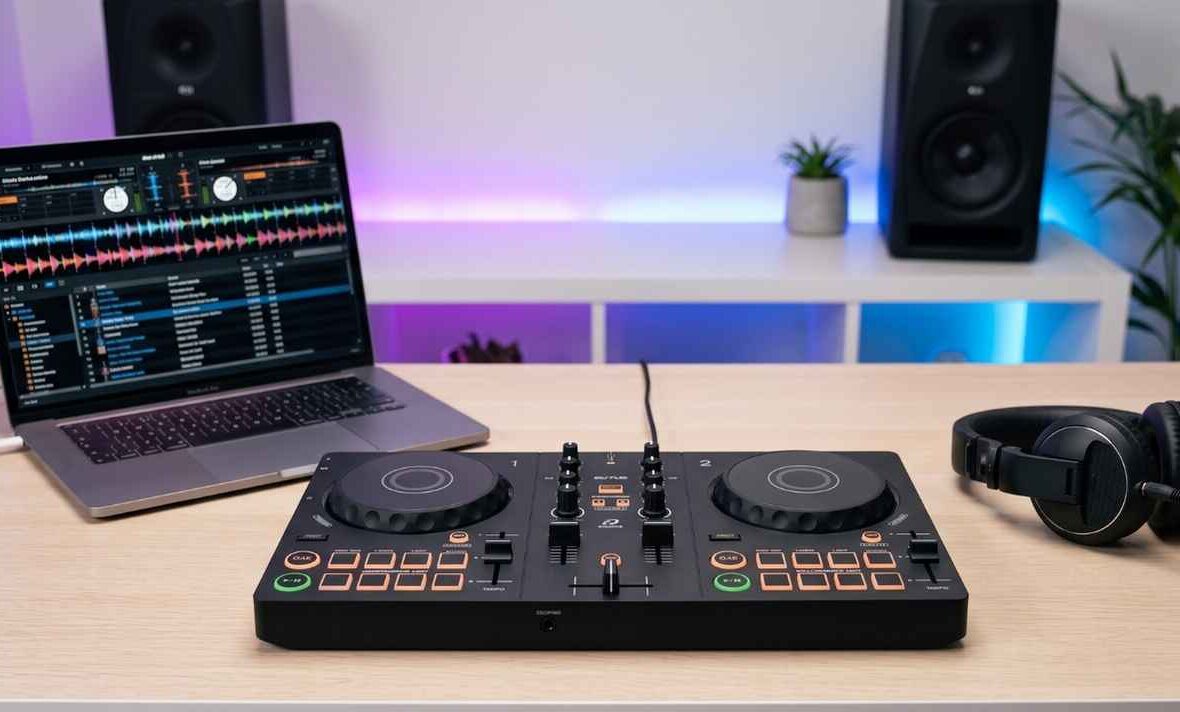
The AlphaTheta (Pioneer DJ) DDJ-FLX2 is the most affordable controller in the current lineup — small enough to live in a backpack and cheap enough to be an impulse buy. It exists to answer one question: “what’s the least I can spend to start DJing properly?” For a long time the answer was the DDJ-200, but that unit had a fatal flaw. The FLX2 fixes it. Here’s an honest overview of what it does, what it leaves out, and whether it’s the right first controller for you.
The DDJ-FLX2 is AlphaTheta’s cheapest and most compact 2-channel controller, ideal as a first controller or an ultra-portable second deck. Its key upgrade over the old DDJ-200 is a built-in soundcard, so you can finally monitor on headphones. It’s genuinely good for learning on a budget — but most DJs who can stretch a little further should buy the DDJ-FLX4 instead.
DDJ-FLX2 at a Glance
Here are the key specs and what they mean for a beginner:
| Spec | DDJ-FLX2 | What it means for you |
|---|---|---|
| Channels | 2 | Mix two tracks — all a beginner needs |
| Software | rekordbox, djay, Serato DJ Lite (+ Traktor Play) | Unlocks free — no subscription to start |
| Built-in soundcard | Yes | You can monitor on headphones (the big fix vs DDJ-200) |
| Outputs | 3.5mm master + 3.5mm headphones | Fine for home speakers; not for big PA systems |
| Mic input | No | Can’t plug in a mic — not for hosting/MC work |
| Power | USB-C bus powered | No power brick; runs off your laptop or phone |
| Smart features | Smart Fader, Smart CFX | Assisted mixing and effects for fast results |
| Build / size | Plastic, ultra-compact (~5″ wide, under 3 lb) | Most portable in the range; toy-ish feel |
| Street price | ~$179 (check current local pricing) | The cheapest serious entry into Pioneer DJ |
(Prices vary by region and over time — always confirm the current Thailand/local price before buying.)
The Big Deal: It Has a Soundcard
The single most important thing about the FLX2 is what it fixes. Its predecessor, the wildly popular DDJ-200, lacked a built-in audio interface — meaning you couldn’t properly monitor your next track on headphones while the current one played out loud. That’s not a minor detail; pre-listening in headphones is fundamental to learning to mix. The FLX2 adds a real soundcard with separate master and headphone outputs, so you can cue up tracks like a proper DJ. This one change turns it from “fun toy” into “legitimate first controller.”
What’s Good About the FLX2
Price and Portability
At around $179 it’s the cheapest way into the Pioneer ecosystem, and it’s the lightest, most compact controller AlphaTheta makes. It runs on USB bus power from your laptop or phone, so there’s no power brick to carry. It genuinely fits in a backpack — perfect for a bedroom setup, a tiny apartment, or travelling.
Flexible Software and Streaming
It unlocks rekordbox, djay, and Serato DJ Lite for free (no subscription needed to start), works on phone, tablet, Mac, or PC, and supports streaming services like Beatport, Beatsource, SoundCloud, and TIDAL — plus Apple Music through djay. For figuring out which software suits you, see rekordbox vs Serato.
Beginner-Friendly Smart Features
Smart Fader auto-matches volume, BPM, and bass as you slide the crossfader, and Smart CFX adds expressive effects with the pads. These let total beginners get a decent-sounding mix on day one. A word of honest caution, though: leaning on Smart Fader too hard can stop you learning to actually beatmatch — use it as training wheels, not a permanent crutch.
What You Give Up
At this price there are real compromises, and you should know them going in:
- No way to browse your library on the unit. You’re reaching for the laptop/phone screen to select tracks — the biggest workflow limitation.
- No mic input. You can’t plug in a microphone, so it’s not suited to hosting, weddings, or MC work.
- 3.5mm outputs only. Great for home speakers, but no RCA outs for connecting to a larger PA — so it’s not really a gig controller.
- No dedicated gain knobs or FX strip. The mixer is stripped to the basics.
- Plastic, lightweight build. It can feel a little toy-like, and small jog wheels limit scratching.
- You’ll likely outgrow it. As your skills grow, you’ll want more control than it offers.
DDJ-FLX2 vs DDJ-FLX4: Which Should You Buy?
This is the decision most beginners are really weighing, so let’s be direct. The DDJ-FLX4 is the better all-rounder and what I recommend to most people: it adds dedicated effects controls, a mic input, RCA outputs, better sound quality, and bigger jog wheels — features you’ll grow into rather than out of. The FLX2 wins only on price and size.
- Buy the FLX2 if: your budget is genuinely tight, you have very little space, you want maximum portability, or you want a cheap ultra-portable second controller alongside a bigger setup.
- Buy the FLX4 if: you can stretch the extra money, want a controller you won’t outgrow as fast, or think you might ever play for other people (the mic and RCA outs matter).
Who the FLX2 Is Really For
It’s an honest yes for two groups: absolute beginners on a strict budget who just want to learn the fundamentals at home, and experienced DJs who want a tiny, cheap travel/backup controller. If you’re neither — and you can afford it — the FLX4 is the smarter long-term buy.
A Note From NaJade
I have a soft spot for gear like this, because the barrier to starting should be as low as possible — and a $179 controller that actually lets you monitor in headphones is a genuinely great on-ramp. But I’ll be straight with you, the same way I would with a student: if the FLX4 is within reach, get the FLX4. The FLX2’s missing library browsing and lack of room to grow mean most people are back shopping within a year. Where the FLX2 truly shines is as a “yes” when the alternative is “I can’t afford to start at all” — in that case, absolutely buy it and start learning today. Gear is just the key to the door; what matters is walking through it. If you want help choosing and then actually learning to mix on whatever you pick, that’s what my lessons are for.
Compare it with the rest of the lineup in my complete Pioneer DJ controller guide, or the wider DJ gear for beginners series. Ready to learn on it? My DJ lessons run in person in Bangkok or online over Zoom.
Frequently Asked Questions About the DDJ-FLX2
Is the DDJ-FLX2 good for beginners?
What’s the difference between the DDJ-FLX2 and DDJ-FLX4?
Does the DDJ-FLX2 work without a laptop?
Can you gig with a DDJ-FLX2?
What software does the DDJ-FLX2 work with?
Is the DDJ-FLX2 better than the DDJ-200?
About the Author
NaJade is a Bangkok-based DJ playing progressive house, melodic EDM, pop, and Thai music across clubs, rooftops, and weddings in Thailand. He teaches beatmatching and mixing to beginners both in person in Bangkok and online over Zoom. When he’s not behind the decks, he’s documenting the journey on YouTube, Instagram, and TikTok.