
By NaJade · DJ in Bangkok · Published September 29, 2026
The standalone system I actually play on — an honest review of who it’s for and whether it’s worth it.
This is the one piece of gear I can review from daily experience rather than a spec sheet: the Pioneer XDJ-RX3 is what I play on. It’s the all-in-one standalone system that sits between beginner controllers and a full club CDJ rig — and it’s become hugely popular with semi-pros and serious hobbyists. Here’s my honest take on what it does brilliantly, where it falls short, and who should actually buy one.
The XDJ-RX3 is a standalone all-in-one DJ system with a club-standard layout and a huge 10.1-inch touchscreen — no laptop required. It’s the ideal step up for DJs serious about performing, bridging beginner controllers and full CDJ setups. The main catches are the price and a couple of odd feature omissions.
What Is the XDJ-RX3?
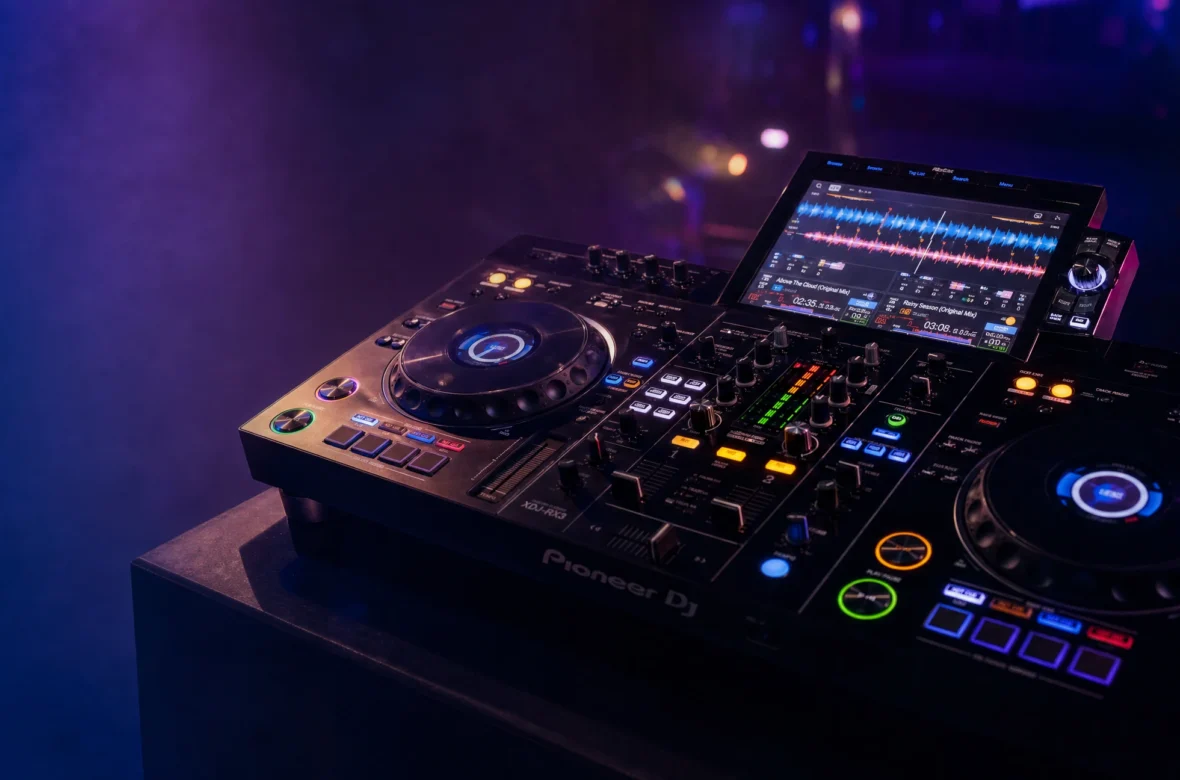
The XDJ-RX3 is a two-channel standalone all-in-one DJ system from Pioneer DJ. “Standalone” is the key word: unlike a controller, it needs no laptop — you plug a USB drive straight in and play, with everything built into one unit. Think of it as a two-deck CDJ setup plus a DJM-style mixer and a touchscreen, fused into a single body. As Pioneer DJ describes it, the workflow is inspired directly by the club-standard CDJ-3000 and DJM-900NXS2 — which is exactly why it’s such a natural bridge to professional gear.
The Good: What It Does Brilliantly
- That touchscreen. The 10.1-inch display is the largest ever on a Pioneer all-in-one, and it transforms browsing and mixing — big, clear waveforms, fast track loading, and tap-to-view track info. It genuinely makes DJing more fun.
- Club-standard layout. The layout mirrors the CDJ-3000 + DJM-900NXS2 setup found in clubs, so the muscle memory transfers directly. Walk into a booth after practising on this and you’ll feel at home.
- No laptop needed. Standalone play from USB keeps your setup clean, portable, and reliable — no software crashes mid-set. It still supports rekordbox and Serato DJ Pro if you prefer laptop-based mixing.
- Pro-grade effects. The full 14 Beat FX and 6 Sound Color FX from the DJM-900NXS2, plus Release FX (vinyl brake, echo, backspin) and Gate Cue — a seriously creative effects toolkit.
- Modern connectivity. Built-in Wi-Fi, rekordbox Link Export (play from a connected laptop like a USB source), multiple USB ports, and clean mic inputs for streamers and mobile DJs.
The Not-So-Good: Honest Drawbacks
- The price. At roughly $2,000–$2,200 (verify current Thai pricing), it’s a serious investment — far beyond a beginner controller. It’s a “committed DJ” purchase, not a first buy.
- No cloud music functions. A surprising omission in 2026; some competing standalone units offer streaming/cloud integration that the RX3 lacks.
- No key sync. Pioneer’s excellent key-sync from the CDJ-3000 didn’t make it in — a missed opportunity for harmonic mixers (more on harmonic mixing).
- Overkill for total beginners. If you’re not yet sure you’ll stick with DJing, this is too much unit (and money) — start on a controller instead.
Who Should Buy It?
Buy the XDJ-RX3 if you’re past the beginner stage and serious about performing — you want a club-standard, laptop-free workflow at home that translates directly to gigs, and you’ve got the budget. It’s ideal for semi-pros, mobile DJs, streamers, and dedicated hobbyists who’ve outgrown an entry controller.
Don’t buy it if you’re just starting out (a DDJ-FLX4 will teach you everything for a fraction of the price), or if cloud streaming and key sync are dealbreakers for your workflow.
The Verdict
The XDJ-RX3 is the best standalone all-in-one for most serious DJs — the screen, the club-standard feel, and the effects make it a joy to play, and standalone reliability is worth a lot once you’re gigging. The price and the odd missing feature (cloud, key sync) keep it from perfect, but as the bridge between learning and the club, it’s hard to beat. If you’re ready to level up and you’ll use it, it’s a genuinely brilliant unit.
A Note From NaJade
I play on the RX3, so I’ll be straight with you: it’s the piece of gear that made me feel like I’d “arrived” as a DJ — not because it made me better (the skills did that), but because the standalone, club-standard workflow meant no more laptop babysitting, and stepping onto club CDJs felt completely natural. That said, I’d never tell a beginner to start here. It’s a step-up unit. I earned my way to it after learning the fundamentals on simpler gear, and that’s the right order. If you’re at the point where you’re gigging or seriously committed and the budget makes sense, it’s a joy to own. If you’re still finding your feet, save your money and put in the hours first — the RX3 will still be here when you’re ready.
Wondering whether to go standalone or stick with a controller? My CDJ vs controller guide unpacks the whole question, and the full DJ gear for beginners guide covers where this fits in the bigger picture. Ready to level up your skills to match the gear? My DJ lessons run in person in Bangkok or online over Zoom.
Frequently Asked Questions About the XDJ-RX3
Is the Pioneer XDJ-RX3 good for beginners?
Does the XDJ-RX3 need a laptop?
What’s the difference between the XDJ-RX3 and a controller?
What software does the XDJ-RX3 work with?
What are the downsides of the XDJ-RX3?
Is the XDJ-RX3 worth it?
About the Author
NaJade is a Bangkok-based DJ playing progressive house, melodic EDM, pop, and Thai music across clubs, rooftops, and weddings in Thailand. He teaches beatmatching and mixing to beginners both in person in Bangkok and online over Zoom. When he’s not behind the decks, he’s documenting the journey on YouTube, Instagram, and TikTok.